 |
Blamite Game Engine - Keystone
00428.01.13.25.2134.blamite
A library that enables the use of Qt in Blamite's editing tools.
|
|
Blamite Game Engine - Keystone
00428.01.13.25.2134.blamite
A library that enables the use of Qt in Blamite's editing tools.
|
Namespace containing components relating to the editor tick. More...
Functions | |
| BLAM void | PrepareTick () |
| Prepares required data for the tick loop. More... | |
| BLAM void | TickThread () |
| Function containing the tick loop. More... | |
| BLAM uint64_t | GetCurrentTickRate () |
| Retrieves the current tick rate. More... | |
| BLAM int | MaxTicksPerSecond () |
| Retrieves the maximum number of ticks per second. More... | |
| BLAM void | ResumeTickLoop () |
| Resumes the tick loop if it has been paused. More... | |
| BLAM void | PauseTickLoop () |
| Temporarily pauses the tick loop. More... | |
| BLAM void | EndTickLoop () |
| Terminates the tick loop. More... | |
| BLAM bool | HasTickStopped () |
| Determines whether or not the tick loop has finished terminating. More... | |
| BLAM bool | IsTickLoopRunning () |
| Determines whether or not the tick loop is currently running - NOT whether it is paused. More... | |
| BLAM void | SetCurrentTickRate (int tickrate) |
| Stops the editor tick, updates the tick rate, and re-starts the editor tick. More... | |
Namespace containing components relating to the editor tick.
Similar to the game engine tick, this tick allows for periodic, routine tasks to be run consistently.
| void BlamKeystone::Tick::EndTickLoop | ( | ) |
Terminates the tick loop.
This should only be called at shutdown, as this will cause the tick thread to conclude as well.
 Here is the caller graph for this function:
| uint64_t BlamKeystone::Tick::GetCurrentTickRate | ( | ) |
Retrieves the current tick rate.
Can be used to measure any potential performance losses.
| bool BlamKeystone::Tick::HasTickStopped | ( | ) |
Determines whether or not the tick loop has finished terminating.
Used to prevent premature editor shutdown while in the middle of proccessing a tick.
true if the tick loop has ended. Otherwise returns false. | bool BlamKeystone::Tick::IsTickLoopRunning | ( | ) |
Determines whether or not the tick loop is currently running - NOT whether it is paused.
true if the tick loop is running, false if it has been stopped (or not yet started). Here is the caller graph for this function:| int BlamKeystone::Tick::MaxTicksPerSecond | ( | ) |
Retrieves the maximum number of ticks per second.
| void BlamKeystone::Tick::PauseTickLoop | ( | ) |
Temporarily pauses the tick loop.
Pausing the tick loop without stopping it entirely can be used in situations where you want to halt game simulation (in a pause screen while in singleplayer, for instance).
Here is the caller graph for this function:| void BlamKeystone::Tick::PrepareTick | ( | ) |
Prepares required data for the tick loop.
Here is the caller graph for this function:| void BlamKeystone::Tick::ResumeTickLoop | ( | ) |
Resumes the tick loop if it has been paused.
Here is the caller graph for this function:| void BlamKeystone::Tick::SetCurrentTickRate | ( | int | tickrate | ) |
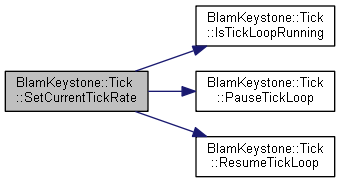
Stops the editor tick, updates the tick rate, and re-starts the editor tick.
| tickrate | - The new tickrate. |
Here is the call graph for this function:| void BlamKeystone::Tick::TickThread | ( | ) |
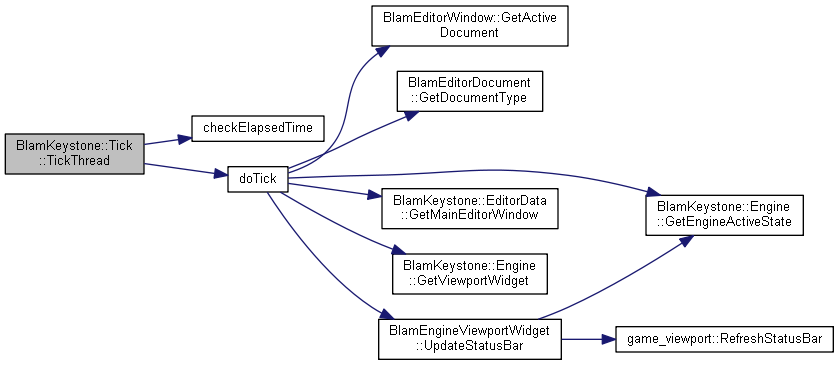
Function containing the tick loop.
This is a blocking call and should only be run in a separate thread.
Here is the call graph for this function: Here is the caller graph for this function: 1.8.17